Let’s be honest: dorm rooms aren’t exactly known for their spacious layouts. By the time you fit a twin XL bed, a roommate, and that one giant textbook you never actually open, desk space becomes a premium commodity. That’s where a Mini PC comes in. It’s one of those solutions that seems obvious in hindsight—all the computing power you need for research, streaming, and everyday tasks, packed into a chassis that doesn’t hog the entire desk.
The 2026 market has some really interesting options now. What used to be a niche product has become a legit alternative to bulky towers and even laptops for students who prefer a dedicated workstation. After looking at what’s available from GenMachine, three series stand out for different types of students: the Ren series for style and balance, the Yi series for raw performance, and the Li series for those watching their budget.

Ren Series: The Stylish All-Rounder Mini PC
There’s something about a device that actually looks good sitting on a desk. The Ren series, based on the concept of “to do unto others is to be kind,” brings a sense of elegance that’s often missing in the world of small-form-factor computers. It’s a Mini PC that doesn’t scream “tech gadget”—it just quietly fits in, whether you’re in a modern apartment or a cramped dorm room.
What’s really nice about this series is the flexibility in placement. You can set it right on the desktop—it’s compact enough to not get in the way—or you can mount it to the back of a monitor using the included back panel. That second option is a game-changer for students who want that ultra-clean, cable-free look. The desk suddenly feels twice as big when the computer itself is hidden behind the screen.
In terms of connectivity, this Ren series doesn’t cut corners despite its size. You’re looking at:
4 USB ports (spread between front and back) for all your peripherals
2 HDMI ports plus a Type-C port for multiple display setups
A round headphone jack—simple but still appreciated
A high-speed network cable interface, alongside Wi-Fi 6
That last point is worth mentioning. Wi-Fi 6 is great, but in a dorm where the network can get congested during peak hours, having the option to plug directly into Ethernet is a real comfort. It’s the kind of thoughtful design that suggests someone actually thought about where this machine would live.
Performance-wise, it runs on an AMD processor with DDR4 3200MHz dual-channel memory and an M.2 NVMe SSD. It also supports 2.5G LAN and USB4.0. For daily office work—writing papers, researching, managing spreadsheets—it’s more than enough. And with Windows 10/11 Pro out of the box, plus Bluetooth 5.2, it’s pretty much ready to go from the moment you unbox it.
Yi Series: The High-Performance Mini PC for Demanding Workloads
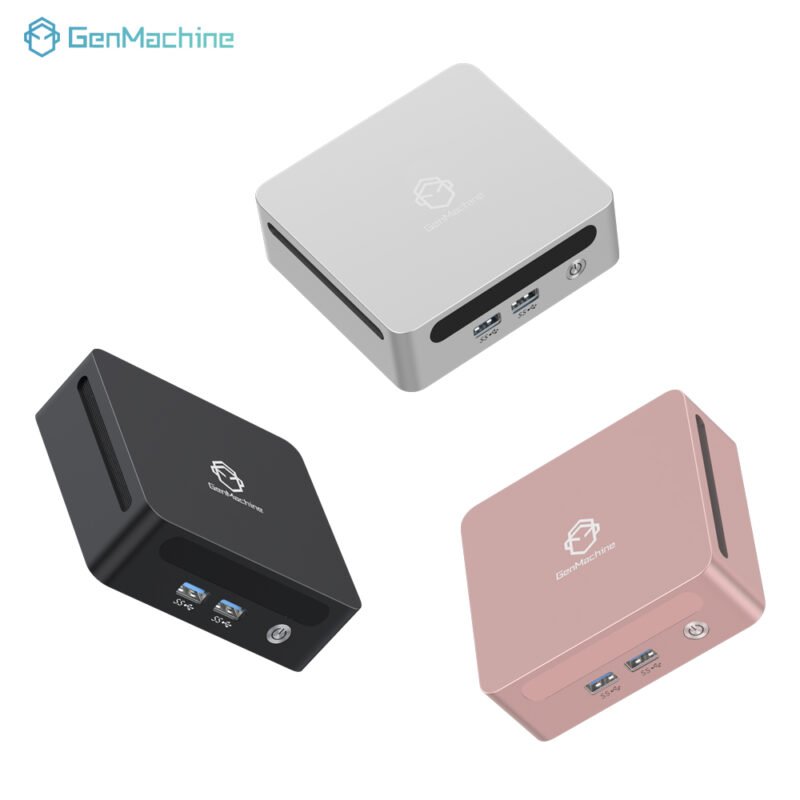
For the engineering students, the data science majors, or honestly anyone who just hates waiting for things to load, the Yi series is a different beast entirely. The name comes from the concept of “high morality, is righteousness,” but the performance here is the real story. This is a Mini PC that packs a serious punch into a 12cm x 12cm frame.
The entire lineup is equipped with Ryzen 7 processors. That alone sets it apart. Ryzen 7 in a chassis this small? It’s the kind of spec that makes you do a double-take. It’s small but strong—inside and out, as they say.
Here’s what makes it stand out for students with heavy workloads:
LPDDR5 6400MHz memory – This is fast. Noticeably fast. For multitasking between coding environments, virtual machines, or large datasets, it makes a real difference.
M.2 NVMe 4.0 SSD – Data transfer speeds that mean boot times and file access feel almost instantaneous.
Rich interface options – USB3.0, HDMI, and a 2.5G LAN port. The 2.5G LAN is particularly interesting for students who might be doing network-heavy work or just want the fastest possible connection in their dorm.
The subjective feel here is that this machine doesn’t compromise. It’s not trying to balance power with aesthetics in the same way the Ren series does—it’s focused on delivering performance for users with strict requirements. For a student running CAD software, doing video editing, or working with large codebases, the Yi series is the kind of machine that quietly does its job without becoming a bottleneck. It’s one less thing to worry about when you’re already stressed about deadlines.
Li Series: The Budget-Friendly Mini PC with Personality
Not every student needs top-tier performance. Some just need a reliable, good-looking Mini PC that doesn’t drain their savings. The Li series, following the concept of “respecting harmony is a gift,” takes a different approach—one that prioritizes value and personalization.
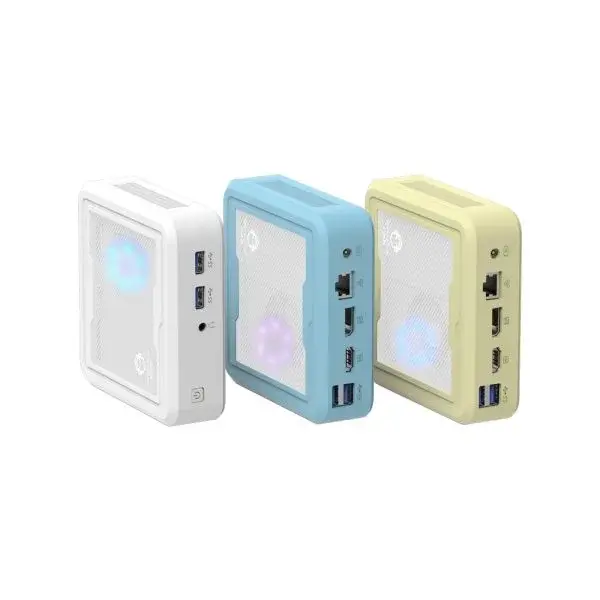
The first thing you notice is the colorful appearance. Most mini PCs are black or silver, maybe dark gray if you’re lucky. The Li series actually comes in colors, which sounds like a small thing until you realize that your desk setup is part of your living space. For students who want their tech to reflect a bit of personality, this is a nice touch. It also makes it a surprisingly good gift option—something to keep in mind for parents shopping for a freshman.
Under the hood, it’s equipped with an AMD Ryzen processor, stable and reliable for daily tasks. The memory configuration is DDR4 2400MHz dual-channel, supporting up to 64GB if you need to expand later. That’s a solid amount of headroom for a budget-oriented machine.
Wireless connectivity includes:
WiFi 5 – Not the latest standard, but perfectly adequate for streaming, browsing, and Zoom calls
Bluetooth 4.2 – Enough for wireless mice, keyboards, and headphones
For a student whose main needs are writing papers, watching lectures, streaming Netflix, and maybe some light photo editing, the Li series hits a sweet spot. It’s not trying to be the fastest thing on the market. It’s trying to be the smartest value, and in that regard, it delivers.
Making the Choice Based on Your Major
If you’re still unsure, maybe this helps narrow it down.
STEM Majors (Engineering, Computer Science, Data Science): Look at the Yi series. The Ryzen 7 processor and LPDDR5 memory will handle compilation, simulations, and heavy multitasking without breaking a sweat. It’s small enough to fit anywhere but powerful enough to keep up with demanding coursework.
General Studies / Humanities: The Ren series is probably the sweet spot. It has enough performance for research, writing, and media consumption, plus the mounting option keeps the desk clean. The 2.5G LAN is a nice bonus if the dorm Wi-Fi gets spotty.
Students on a Tight Budget / First-Year Students: The Li series makes a lot of sense. It covers all the basics reliably, and the colorful design adds a bit of personality without costing extra. It’s also a solid choice for anyone who just needs a secondary machine for the dorm while keeping a laptop for classes.
FAQ
Can these Mini PCs handle dual monitors for a productive study setup?
Yes. The Ren series specifically has 2 HDMI ports plus a Type-C port, which easily supports dual monitors—or even triple displays if you use all three. The Yi series also offers HDMI and USB3.0 options for multi-monitor setups.
Are these Mini PCs portable enough to move between dorm and home during breaks?
Definitely. All three are compact—the Yi series is only 12cm*12cm, and the Ren and Li are similarly small. They can fit into a backpack or even a large tote bag. Moving in and out of dorms at the end of the semester becomes much less of a hassle compared to lugging around a traditional desktop tower.
Is there any noticeable fan noise during late-night studying?
The Ren and Yi series use active cooling, so there is some fan noise under heavy load, but it’s generally quiet during normal use like web browsing or writing papers. The Li series is also designed to run quietly. For most students, the noise level won’t be an issue—certainly not enough to disturb a roommate unless you’re running something intensive at 2 AM.