Walk into a modern warehouse or a minimalist front desk setup these days, and those giant, dust-collecting desktop towers are almost nowhere to be seen. It is actually quite fascinating how the hardware landscape keeps shrinking. Usually, when people think about a tiny desktop computer, they immediately picture standard Windows setups. But there is a totally different side of the market quietly taking over certain niches. Using a mobile-based operating system on a desktop feels a bit weird at first, but an Android-powered mini PC is actually proving to be a brilliant tool for very specific jobs. For lightweight office work and highly repetitive industrial control tasks, paying for a massive processor and a bloated operating system just does not make financial sense anymore. These little boxes just sit there, barely drawing any electricity, running basic apps flawlessly.
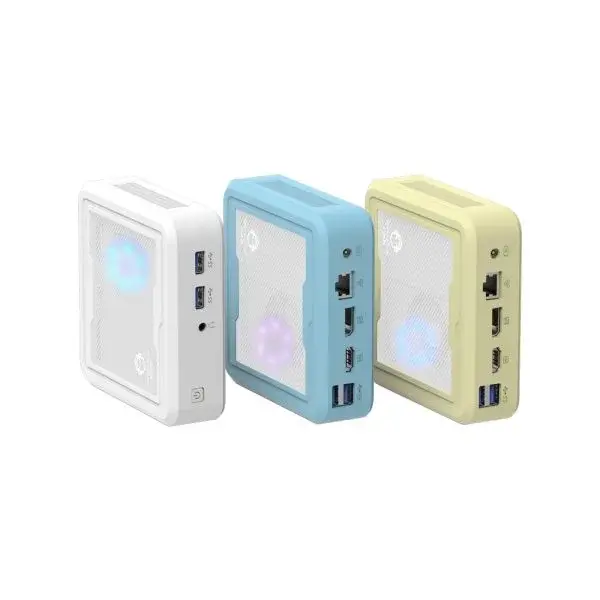
Why an Android Mini PC Makes Sense for Basic Work
Setting up a workstation for basic data entry or answering emails does not require a thousand-dollar gaming rig. Honestly, most daily office tasks happen entirely inside a web browser or a cloud-based application anyway. Dropping an Android mini PC on a desk is a surprisingly clever workaround for businesses trying to cut hardware costs. The interface feels exactly like a massive tablet, which means the learning curve for front-desk staff is practically zero.
There are some very obvious perks to going this route for lightweight office environments:
The hardware costs are ridiculously low compared to traditional computers.
Boot times are almost instant, getting right to the home screen without long, frustrating loading circles.
App ecosystems are already familiar to anyone who owns a smartphone, making software deployment super easy.
Of course, it is not meant for heavy video editing or complex local spreadsheets. But for typing up quick documents, managing schedules, or running a simple point-of-sale system, a mini PC running mobile software is just ridiculously practical. It kind of forces the workspace to remain focused on basic, lightweight tasks without the distraction of complicated desktop software.
Pushing the Mini PC into Industrial Control Environments
Moving away from the carpeted office, the factory floor is where these devices actually get really interesting. Industrial control systems used to rely on massive, incredibly expensive legacy machines that were a constant nightmare to maintain. Now, technicians are just mounting a tiny mini PC directly onto the back of a manufacturing machine or a dusty assembly line monitor.
Because the Android architecture is inherently lightweight, it rarely crashes or gets bogged down by unnecessary background updates (which is a massive headache with standard desktop operating systems). These devices just run a single, dedicated application all day long to monitor temperatures, track inventory barcodes, or control robotic arms.
When looking at the physical hardware requirements for industrial settings, the priorities shift completely from what a normal office worker would want.

| Hardware Feature |
Standard Office Use |
Industrial Control Focus |
|---|---|---|
Outer Casing |
Usually cheap plastic, aesthetically pleasing |
Heavy-duty fanless metal enclosures to block out warehouse dust |
Port Selection |
Basic USB and HDMI connections |
Legacy serial ports (RS232) and dual Ethernet for factory machines |
Power Delivery |
Standard wall adapters |
Wide-voltage inputs to handle random power spikes on the factory floor |
It is pretty wild seeing a cheap, tablet-based mini PC flawlessly running a heavy piece of manufacturing equipment, but the reliability of a simplified operating system just works beautifully in harsh, dirty environments.
Deploying a Mini PC for Smart Signage
There is another area where this specific hardware shines, and it is usually bolted high up on a wall. Digital billboards, restaurant menu boards, and interactive mall kiosks almost always run on a tiny computer hidden behind the screen. An Android-based mini PC is arguably the absolute best tool for this specific job because it handles constant media playback without suddenly lagging.
Getting these digital displays up and running usually follows a pretty straightforward process:
Secure the mini PC behind the commercial monitor using a standard VESA mount bracket so it stays completely out of sight.
Configure the device settings to automatically boot up the moment it receives power (so nobody has to climb a tall ladder to press a button after a random power outage).
Install a kiosk lockdown application that forces the system to only display the chosen video loop or digital menu, preventing random pop-up notifications from ruining the display.
Since these tiny boxes do not generate much heat, they survive perfectly fine crammed behind a hot television screen playing advertisements all day long.
FAQ
Can you run standard Windows programs on this hardware?
Not directly, no. Since an Android mini PC uses a completely different software architecture built mostly for mobile applications, standard desktop software simply will not install natively. However, many companies bypass this by using remote desktop applications to log into a main server, essentially turning the tiny box into a cheap remote portal for heavier work.
Is a mini PC safe enough for enterprise or factory networks?
Security is definitely a valid concern when utilizing mobile operating systems. Out of the box, they have some vulnerabilities. But when used for industrial control or enterprise tasks, IT departments usually lock these devices down completely with mobile device management software. This completely restricts the mini PC to running only pre-approved applications and blocks any unauthorized web browsing entirely.
Do these devices overheat if left on constantly?
They actually handle continuous operation surprisingly well. Because the processors inside an Android mini PC are basically the same highly efficient chips found in modern smartphones, they produce very little ambient heat. Most models designed specifically for industrial control do not even have moving cooling fans, relying entirely on the thick metal chassis to passively dissipate whatever small amount of heat is generated.