A consumer router is sized for the internet plan it shipped with, not for what a network grows into. Add cameras, a NAS, remote access and a guest network, and the box that handled browsing starts dropping packets during large transfers; switch on a VPN and throughput falls further.
Yes, a mini PC can take over that job, and the build is routine once two constraints are accepted. The machine must be x86-64 with at least two wired Ethernet ports, one facing the modem and one facing the internal network, and its network and storage controllers must be supported by FreeBSD, the system pfSense is built on. The rest is installation, interface assignment and verification.
The sections below cover compatibility, the installation sequence, the single-port case and the firewall policy that makes the result usable.
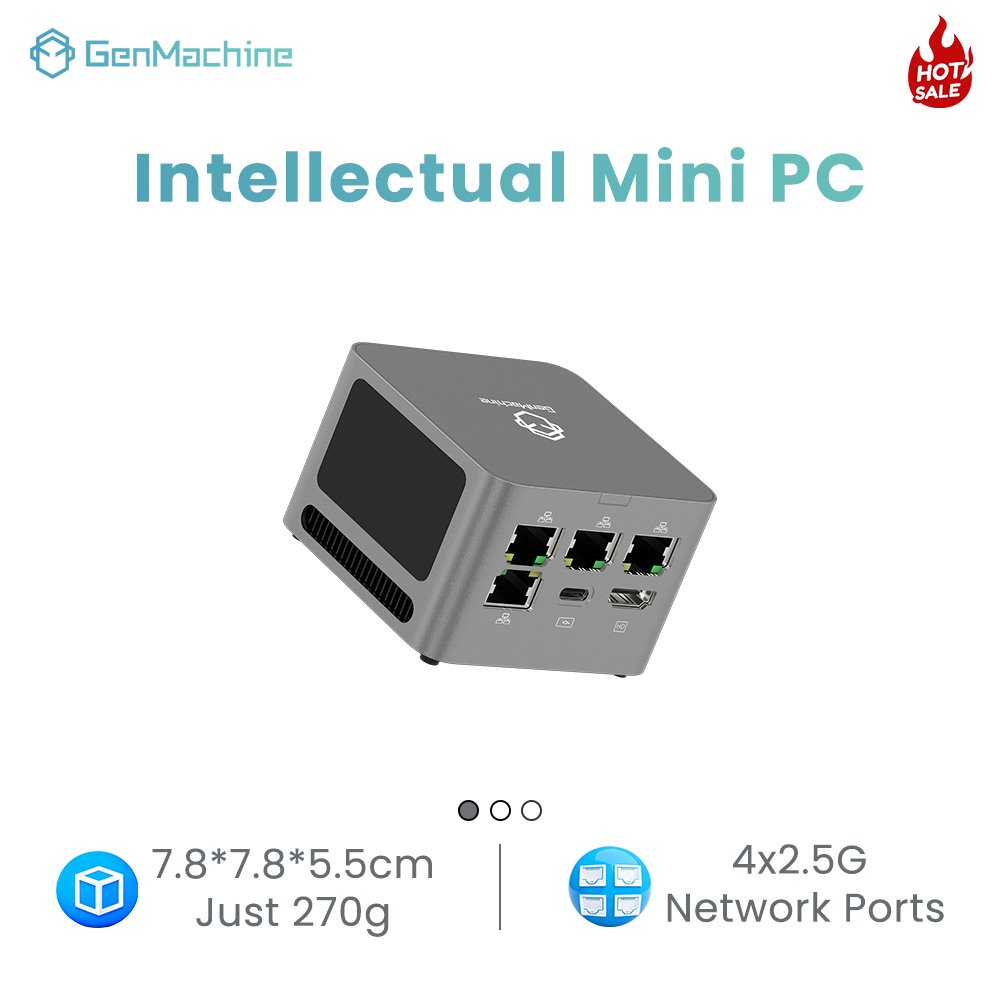
Why Replace a Consumer Router with a Mini PC?
A mini PC replaces a consumer router when processing, not wireless coverage, is the limiting factor. It brings x86 compute, more memory and dedicated Ethernet controllers to routing, encryption and inspection, while Wi-Fi moves to separate access points.
A consumer unit puts CPU, switch, radios and firmware on one chip, which is efficient and also why every function competes for the same silicon. Turn on inspection or encryption and the cores that were forwarding packets now inspect and encrypt them too. A four-port Ryzen mini PC used as a router gives the firewall a general-purpose CPU, upgradeable memory and dedicated physical interfaces instead.
| Capability | Consumer router | Mini PC running pfSense |
| Wired throughput | Sized for the WAN link, falls with inspection | Scales with cores |
| Connection table | Fixed and often small | Sized by installed RAM |
| VPN | Shares the same chip with routing | AES acceleration on supported CPUs |
| Segmentation and logs | A few VLANs, shallow logs | Per-interface rules and counters |
| Wireless | Built in | Requires separate access points |
Where the Headroom Comes From
The gain is not clock speed. It is a state table large enough for thousands of concurrent connections, spare cores for engines that examine every packet, and hardware AES support that keeps tunnels from collapsing.
What You Give Up
There is no radio, so Wi-Fi becomes a separate purchase and a separate place to troubleshoot. Patching and rule maintenance become your responsibility, and the machine is a single point of failure. Nor does it repair weak coverage, which is a problem of radios, antennas, placement and interference.
Can You Install pfSense on a Mini PC?
Yes. pfSense runs on 64-bit amd64 hardware, and the published minimums are modest: a 64-bit amd64 CPU, 1 GB of RAM, an 8 GB disk, one or more compatible network interface cards and bootable media. Those figures describe what will boot, not what will perform, and they say nothing about whether the specific controllers in a given machine are supported. The requirements are listed in the official pfSense minimum hardware requirements.
That distinction matters more than any benchmark. pfSense inherits hardware support from FreeBSD, so a port that works in another operating system may have no driver at all, and a second port wired internally through USB will not behave like a native controller. The question is not how fast the machine is, but which controller each port is attached to. If the hardware is not bought yet, the criteria overlap with those in this homelab mini PC guide.
Checking Hardware Compatibility Before You Commit
- Identify the controller behind each port, not just the port count. Controller families differ in driver maturity, and a cheap addition can cost more CPU than the routing workload.
- Confirm the storage interface, since an unusual bridge chip can leave the installer blind to the disk.
- Check the firmware for options that hide hardware, such as ports disabled by default.
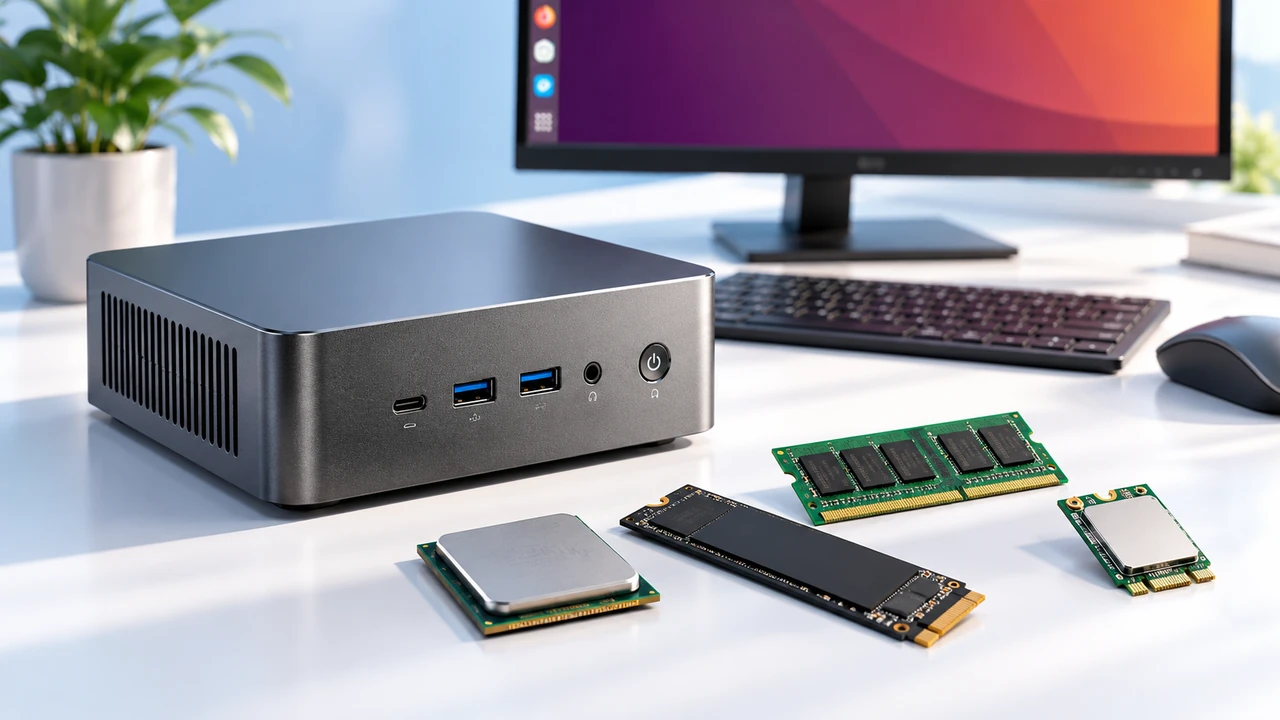
- For any add-in module, verify what the slot carries, because an M.2 slot keyed for Wi-Fi may expose PCIe, USB or a proprietary interface.
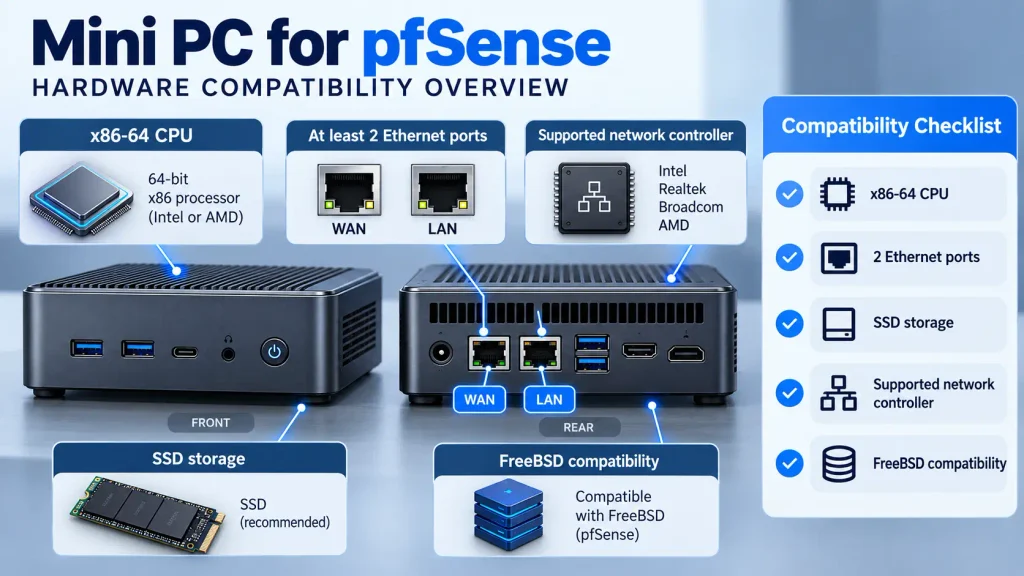
An unrecognised onboard Wi-Fi card is normal. If a port fails to appear, list the interfaces at the console before concluding the install failed.
Minimum, Sensible, and Overkill Configurations
Size the machine to what you intend to run, then add headroom for the package you will install later.
| Component | Minimum | Sensible | Overkill |
| CPU | Any x86-64 dual-core | Four low-power cores with AES support | Six or more cores for multi-gig inspection |
| RAM | 4 GB | 8 GB | 16 GB or more with intrusion detection |
| Storage | 32 GB SSD | 64 to 128 GB SSD | 256 GB NVMe for long log retention |
| Ports | Two gigabit | Two to four 2.5GbE | Four or more for separate segments |
| Fits | Under 500 Mbps, no inspection | 1 Gbps with VPN and moderate rules | Multi-gigabit links with inspection |
Memory goes to the state table and packages, storage to logs that grow faster than expected. The middle column is where most small networks land, and a Balanced Mini PC covers its compute side; port count must be confirmed separately, since series pages publish processors and storage rather than network interfaces.
Why Port Count Changes the Whole Build
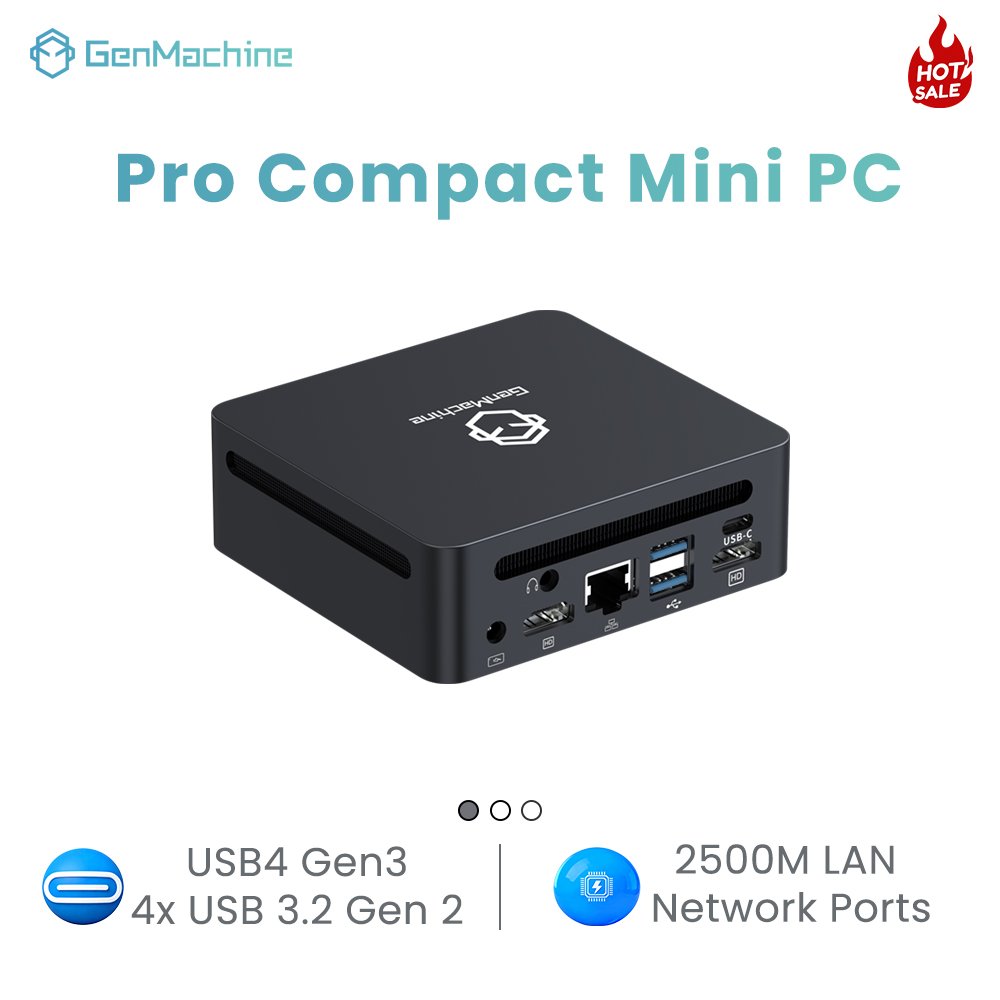
Two ports are the default because they map cleanly onto WAN and LAN. Four remove the need for VLAN tagging on the router side and give each segment a physical interface. More ports are not automatically better: if all of them lead back into one gigabit switch, they add flexibility without throughput. Port layout is reviewed in this mini PC interface checklist.
Four ports are worth paying for only when the segments are real, and the controller model should be confirmed before ordering.
How to Turn a Mini PC into a pfSense Router: Step by Step
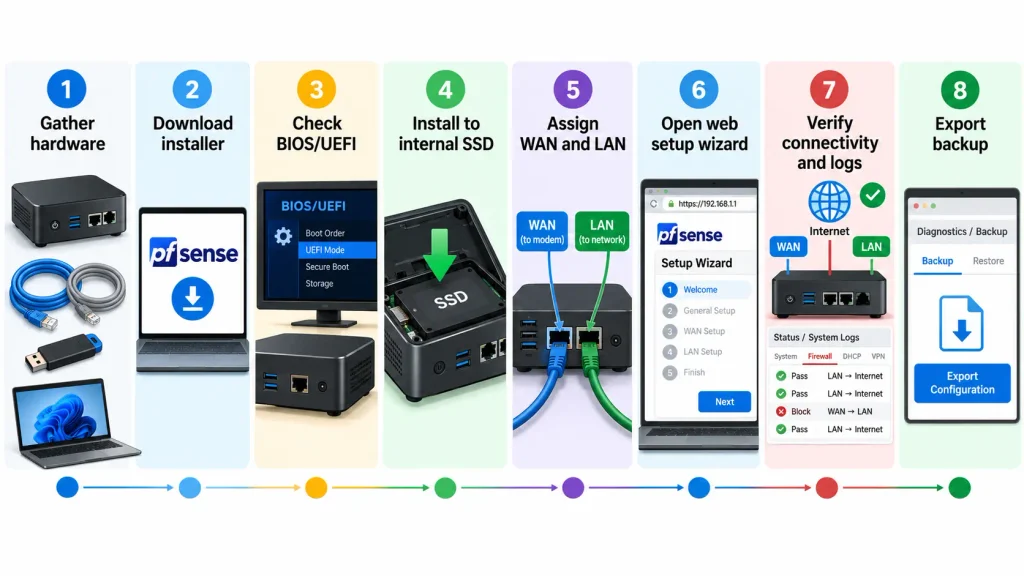
The sequence is: gather the machine and two cables, write the official installer to a USB drive, adjust firmware settings, install the Community Edition to the internal disk, assign WAN and LAN, complete the setup wizard, verify connectivity and export a backup. Budget an evening, and keep the old router connected until verification passes.
- Stage the mini PC, two Ethernet cables, a USB drive of 8 GB or more, a laptop and any PPPoE credentials.
- Prepare the installer and confirm the machine can reach the internet while it runs.
- Match the boot mode to the media, enable restart after power loss, and confirm both ports are visible.
- Install to the internal disk, accepting that everything on it will be erased.
- Connect the laptop to the LAN port and open the default management address.
- Complete the wizard: administrator password, WAN type, LAN subnet, DHCP range and DNS.
- Verify in order: gateway reachability, name resolution, internet access, firewall log behaviour.
- Update, then export the configuration and store it off the router.
Downloading the Installer and Preparing the USB Drive
The official media comes from the project’s documentation, and the current installer fetches packages during setup, so the machine needs a working path to the internet while it runs; connecting the WAN port to the upstream gateway for the duration is the simplest approach. The Community Edition is free and community-supported and is the reference build here, while the commercial edition is licensed and aimed at supported appliances. Details are in the official pfSense installation guide.
BIOS and UEFI Checks Before Booting
Match the boot mode to the media, so a UEFI image is not written onto legacy-boot firmware. Enable restart after power loss, or a brief outage leaves the network down until someone presses the button. Confirm in firmware that both controllers are enumerated, which is the cheapest compatibility test available. Disabling onboard Wi-Fi and Bluetooth is optional and belongs in troubleshooting when interfaces are misidentified. The procedure is covered in this BIOS setup tutorial.
Assigning WAN and LAN Without Guessing
Physical numbering rarely matches logical numbering. Identify each port by MAC address, or by plugging a cable in and watching which interface reports a link, then assign WAN to the upstream device and LAN to the internal switch. The console lists negotiated speed and link state, which catches a bad cable early. The default LAN address is 192.168.1.1/24; if the upstream already uses that subnet, change it first, because overlapping subnets break routing in ways that look like random failures.
First Connection and Verification
Open the management interface over HTTPS from the LAN side and change the default administrator password immediately. Then verify in a fixed order, since each step isolates a layer: ping the LAN address for the local path, resolve a hostname for DNS, reach an external address for NAT and the default route, then check the firewall log to confirm traffic is evaluated rather than silently passed. Finish with a power cycle, which shows whether the machine returns with interfaces assigned and clients online.
What If Your Mini PC Has Only One Ethernet Port?
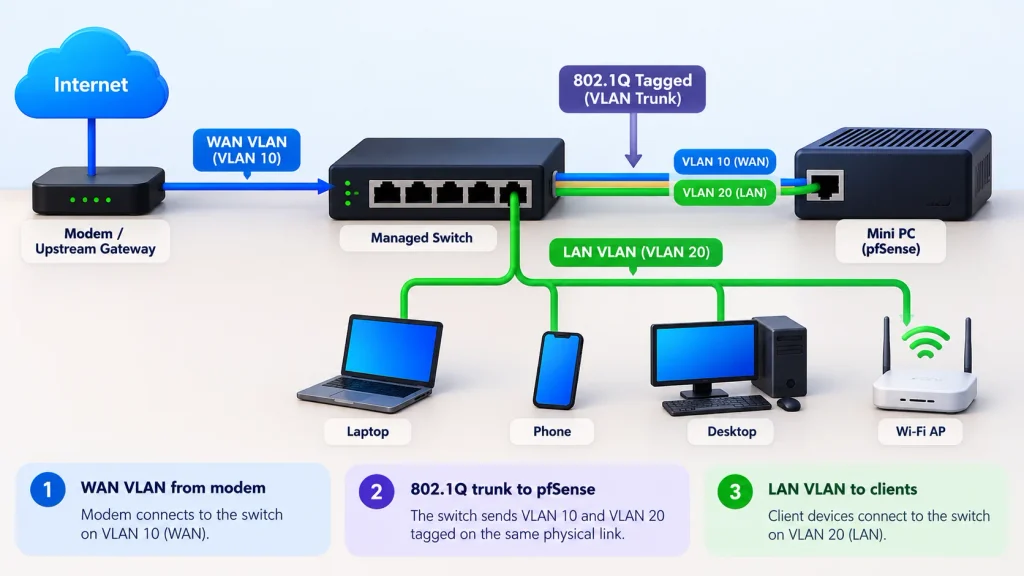
One port is workable, but it is an advanced configuration rather than the default one. Two physical ports remain the recommendation for a first build because they separate WAN and LAN in hardware. A single port can carry both networks as tagged VLANs through a managed switch, while a USB adapter is a testing tool rather than a permanent interface.
The trade is configuration complexity rather than capability.
VLAN Trunking with a Managed Switch
The router keeps one physical port and creates two logical interfaces, each bound to a different VLAN tag. The switch port facing the router carries both tags as a trunk, and the ports serving client devices stay untagged on the LAN VLAN. Traffic from the upstream connection is placed on the WAN VLAN; everything else stays on the LAN.
This requires a switch that supports 802.1Q tagging, since an unmanaged switch cannot separate the networks at all. Most failures trace back to configuration: a port on the wrong native VLAN, a tag missing at one end, or an upstream device sending untagged frames that land on the wrong side. The realistic risk is traffic in the wrong broadcast domain or the WAN side leaking inward, which is serious enough without treating a loop as inevitable.
Add-In and USB Adapters, and What They Cost You
| Method | Throughput | Behaviour under load | Sensible use |
| USB 2.0 adapter | A few hundred Mbps | Interrupt-heavy, runs warm | Temporary console access |
| USB 3 gigabit adapter | Near gigabit in bursts | Jitter, heat, driver variance | Lab work and testing |
| M.2 2.5GbE module | Close to native | Depends on slot wiring and cooling | A permanent second port |
| Managed switch trunk | Line rate | Depends on switch configuration | A permanent single-port build |
M.2 modules need a specific caution: confirm the slot supplies the interface the module requires, that the keying matches, and that it is not reserved for a wireless module. Thermal headroom is also tighter than it looks.
How to Configure pfSense as a Router and Firewall
A pfSense installation is already a router and a stateful firewall, and both roles are configured in the same place. Interfaces define the networks, and rules on those interfaces decide which traffic may cross them. Rules are evaluated from the top of the list downward, and the first rule that matches a packet decides its fate.
That sentence explains most rule mistakes. Rules are an ordered list, not independent conditions, so a broad rule near the top silently overrides everything below it. Floating rules, interface groups and the quick option change where evaluation happens, so the visible order on an interface tab is not always the full processing order. The official pfSense firewall documentation describes the model.
A Minimal Rule Set That Works
- Allow the trusted network out to any destination while the policy is being built.
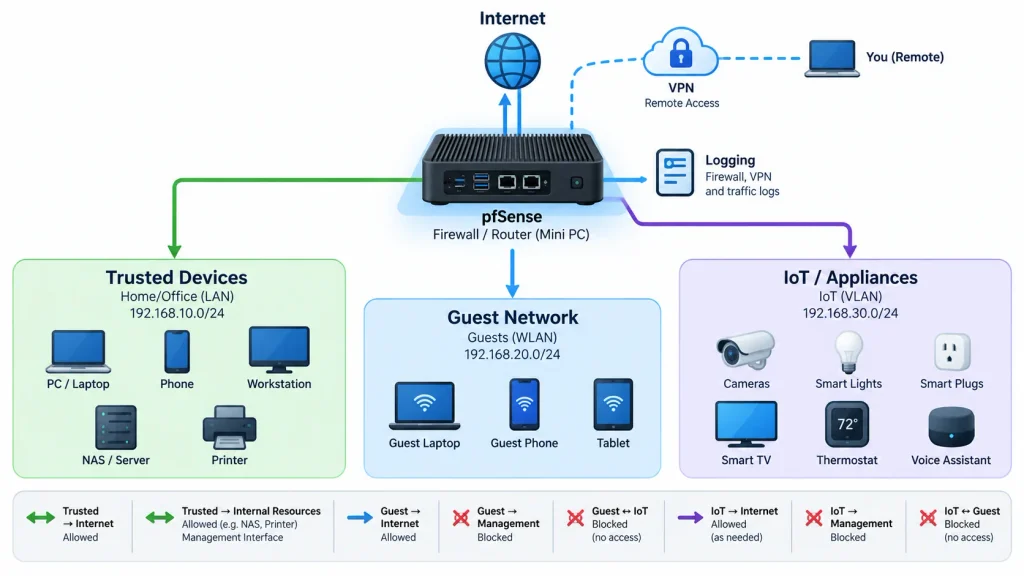
- Block the guest network from internal networks and the management interface, leaving internet access intact.
- Decide deliberately whether WAN answers pings; silence is usually the right default.
- Log blocks for the first weeks, because a silent block rule becomes a support ticket.
Segmentation Without Overbuilding
Three segments cover most small networks: trusted devices, guests, and appliances that cannot be trusted to patch themselves. Each needs its own address range, DHCP scope and a decision about whether it may reach the others. The default should be no, with narrow exceptions such as a management host reaching one device interface on a specific port. Resist building eight VLANs on the first evening.
Packages, VPN, and the Throughput You Actually Get
Measure first. A throughput test through the mini PC router with no packages loaded establishes the baseline every later decision is compared against.
Inspection engines examine every packet, so their cost scales with throughput and rule-set size, while flow monitoring and heavy logging add disk writes and memory pressure. Whether a package is cheap depends on list size, update frequency and enabling mode, which makes reputations a poor guide.
VPN throughput splits by protocol. IPsec and OpenVPN in AES mode benefit from AES acceleration in the CPU. WireGuard uses a different cipher and is bound more by single-core performance, so a CPU chosen for IPsec is not automatically best for WireGuard. Pick the protocol by client support, then check the CPU against it.
pfSense vs OPNsense vs OpenWrt
All three route packets on the same mini PC, and the differences are in release cadence, interface design and package ecosystem. pfSense is the most heavily documented, OPNsense is a fork with a faster release cycle, and OpenWrt is lighter and more oriented toward wireless hardware.
| System | Character | Reasonable choice when |
| pfSense CE | Mature, extensive documentation, broad package set | You want a documented path and a stable base |
| OPNsense | Fork with a modern interface and frequent releases | You prefer faster updates |
| OpenWrt | Light, strong wireless heritage | Hardware is constrained or the box is also an access point |
Configurations do not transfer between them, so commit before building a rule set.
FAQ
Three questions come up once the build reaches the point of going live.
Can the mini PC also provide Wi-Fi?
Not as a dependable access point. pfSense does not turn ordinary wireless cards into access points, and antennas inside a small chassis are poor substitutes. Keep routing and radio separate.
How much electricity does a router built on a mini PC use?
It depends on the CPU, port count and whether inspection runs, but low-power units typically idle in the single digits to low teens of watts. Multiply continuous watts by 8,760 and divide by 1,000 for annual kWh, so a steady 10 W is roughly 88 kWh a year. Measure at the wall first.
Can pfSense run in a virtual machine on the same mini PC as other services?
Yes, and it is common in labs. The interfaces must be passed through or bridged correctly, the virtual machine must start before anything that depends on it, host maintenance takes the whole network down, and a host failure removes the gateway with every other service. For a household’s only internet path, bare metal is safer.