Mini PCs are bought for the compute they pack into a small chassis, and the specification sheet is read from the processor downwards. The Ethernet port sits near the bottom and is treated as a formality. It is not one. With no expansion slot, the port fitted at the factory becomes the ceiling for every file the machine will ever move.
Choose 2.5GbE if the mini PC regularly exchanges large files with a NAS, a backup target, another workstation or a virtualization host, and choose 1GbE only if the machine is a browsing, point-of-sale, signage or thin-client box that never moves bulk data across the local network. Neither standard changes internet speed, so the decision belongs to local traffic rather than to the broadband plan.
The reasoning becomes clear once both standards are compared on measured throughput rather than on the number printed on the box.
What 1GbE and 2.5GbE Actually Mean on a Mini PC
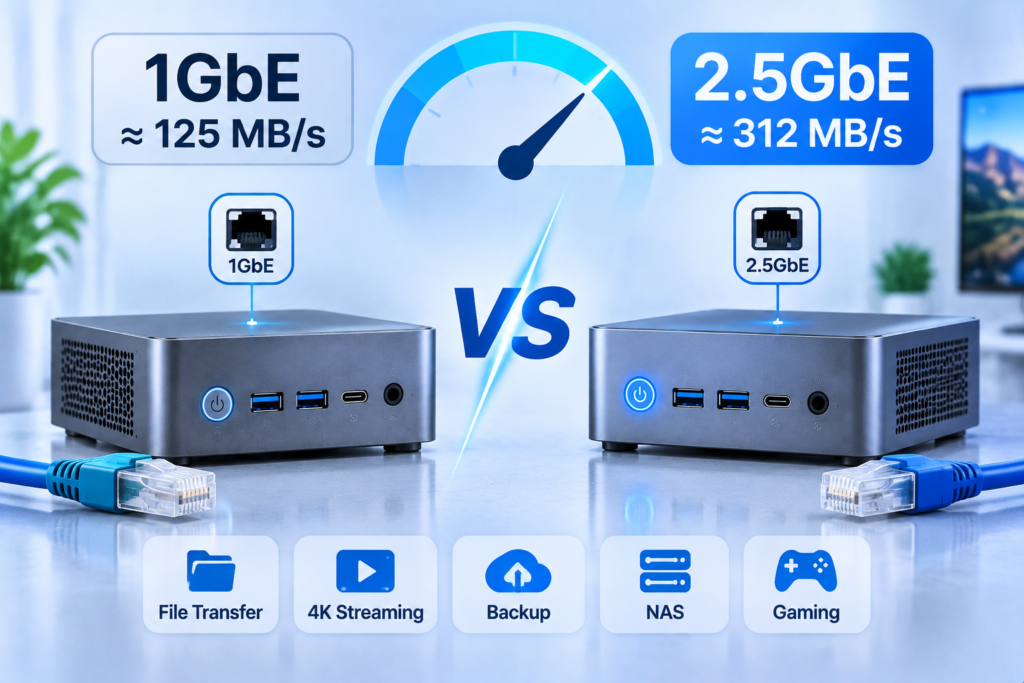
The labels describe the negotiated link rate of the port, not the throughput an application receives. Gigabit Ethernet carries roughly 110 to 118 MB/s of usable transfer, 2.5GbE roughly 280 to 295 MB/s, and the gain of about two and a half times applies to large sequential transfers while shrinking to almost nothing on many small files.
The gap comes from framing overhead, acknowledgement traffic and protocol headers, which remove five to eight per cent of the raw bit rate. Throughput is quoted in megabytes while link rate is quoted in megabits, and a byte carries eight bits, so 1 Gbps divides to 125 MB/s before overhead and about 118 MB/s after it. Both links are full duplex, so the rate applies in each direction at once.
| Standard | Link rate | Typical throughput | Minimum cable | Distance | Ratified |
| 1000BASE-T (1GbE) | 1 Gbps | 110 to 118 MB/s | Cat5e | 100 m | 1999 |
| 2.5GBASE-T (2.5GbE) | 2.5 Gbps | 280 to 295 MB/s | Cat5e | 100 m | 2016 |
| 5GBASE-T (5GbE) | 5 Gbps | 550 to 600 MB/s | Cat6 | 100 m | 2016 |
| 10GBASE-T (10GbE) | 10 Gbps | 1,050 to 1,180 MB/s | Cat6a | 100 m | 2006 |
The Numbers Behind the Labels
2.5GbE was not created to sell cable. It was ratified as IEEE 802.3bz in 2016 to run at 100 metres over the four-pair Cat5e already installed in most buildings, at a fraction of the cost and power of 10GBASE-T, which is why it became the default small-system port. A directory of ten thousand small documents, by contrast, is limited by metadata operations and latency rather than bandwidth, and runs at a fraction of the link’s capability regardless of the port.
Why Mini PCs Adopted 2.5GbE First
Two pressures pushed the compact form factor towards multi-gigabit earlier than tower desktops. Access points built to 802.11ax and later aggregate more traffic across their radios than one gigabit uplink can carry, so a 1GbE port caps them at roughly forty per cent of capability on installation day. The second pressure is structural: a tower accepts a network card at any point in its life, while a mini PC does not, because the port is soldered and the chassis is sealed.
On most current models the port is therefore baseline rather than a paid upgrade. What differs is the number of ports and the controller behind them, so look for a rate stated per port, since “up to 2.5Gbps” sometimes describes a shared controller.
Where 2.5GbE Pays Off and Where It Does Not
2.5GbE pays off only when the bottleneck sits inside the building. It does nothing for web browsing, cloud synchronisation, video calls or streaming from the internet, and it does a great deal for backup windows, virtual machine images, media library maintenance and shared project folders between machines you own.
The Internet Myth
A gigabit fibre plan typically measures 850 to 940 Mbps after session overhead and provider shaping, already inside a gigabit port’s ceiling. A 2.5Gbps WAN port matters only when the plan exceeds 1 Gbps, and even then the optical termination, the router, its routing throughput with firewall rules applied, and the client port all have to agree.
Local Traffic Is Where the Gain Lives
| Workload | Data volume | On 1GbE | On 2.5GbE | Verdict |
| System image backup to a NAS | 200 GB | about 30 min | about 12 min | Worth it |
| Photo and video library sync | 60 GB | about 9 min | about 3.5 min | Worth it |
| VM image migration between hosts | 80 GB | about 12 min | about 5 min | Worth it |
| Nightly incremental backup | 5 GB | about 45 s | about 20 s | Marginal |
| Single 4K stream from a media server | 60 to 80 Mbps | no limit reached | no limit reached | No gain |
Gains appear when one job moves tens of gigabytes in a single stream, and vanish when the job is small, latency-bound, or the far end cannot fill the link.
A virtualization host is where the gain is easiest to underestimate, because the traffic is invisible. Guests writing snapshots and images to shared storage across one gigabit uplink produce queueing that surfaces as unexplained latency inside the guests rather than as a slow file copy. Buyers sizing a compact host will find this guide to a Mini PC for Your Homelab Needs useful on the memory and storage trade-offs, and the port belongs in the same calculation.
The Weakest Link: Switch, Cable, and Storage
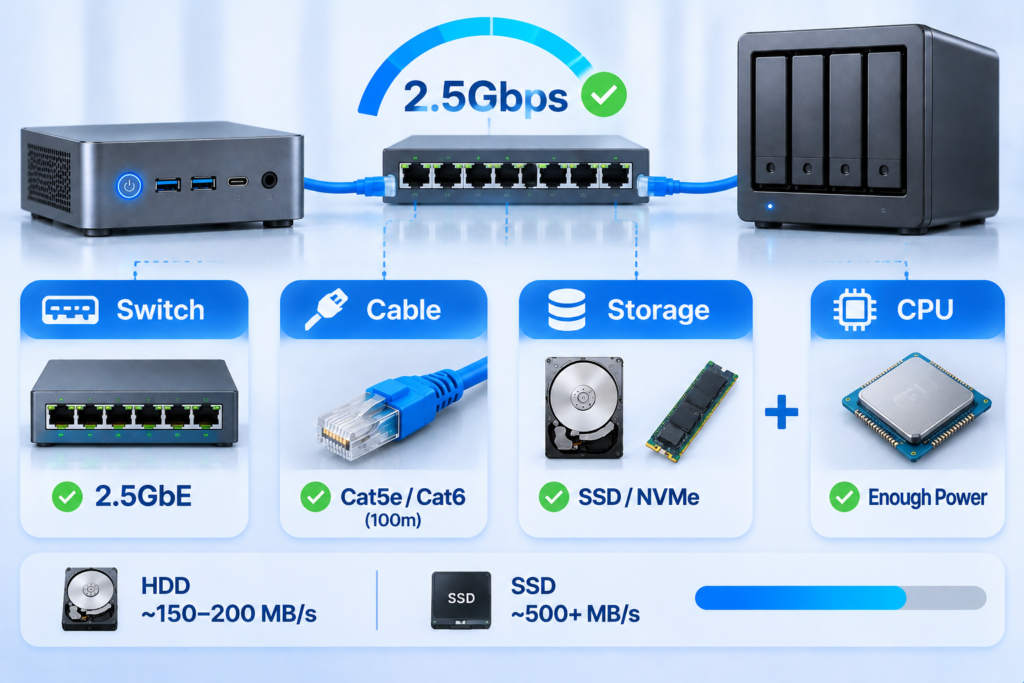
A 2.5GbE port delivers 2.5Gbps only when every element between the endpoints negotiates at that rate. The switch is the component buyers forget, the cable is the component they misjudge, and the storage is the component that decides whether any of it matters.
The Switch Is the Part Buyers Forget
A 2.5GbE port connected to a gigabit switch port negotiates down to gigabit, and the owner concludes the upgrade produced nothing. The fix is cheap: an unmanaged multi-gigabit switch with five to eight ports needs no configuration. Placement matters too, because traffic between a mini PC and a NAS on the same switch never reaches the router, which therefore needs no multi-gigabit ports. Every port negotiates independently, so a printer running at gigabit does not slow its neighbours.
Cabling Reality
Cat5e handles 2.5GBASE-T to the full 100 metres defined by the standard, which covers virtually every office and residential run. Cat6 adds margin against crosstalk and suits new installations, while Cat6a is necessary only for 10GBASE-T.
Cable faults rarely announce themselves. The usual symptom is a link that negotiates at 2.5Gbps and then drops to 1Gbps under load, or throughput that stalls while retransmissions accumulate. Copper-clad aluminium conductors, common in low-cost patch leads, complete negotiation and then fail to hold the rate, so solid copper and a certified category marking are the practical checks.
Storage and CPU Set the Ceiling
A single mechanical drive reads sequentially at roughly 150 to 200 MB/s at the outer tracks and less towards the inner, so a gigabit link already comes close to saturating it. Solid-state arrays and NVMe cache tiers are what consume a 2.5Gbps link, which is why the port matters on a machine acting as a Database Mini PC or shared storage node.
Processor load belongs in the same calculation. Encryption, parity and on-access scanning consume cycles per megabyte, and a modest processor can become the limit before the network does: a machine managing 290 MB/s unencrypted may manage 180 MB/s with encryption enabled.
Single or Dual 2.5GbE Ports: What the Second Port Buys You
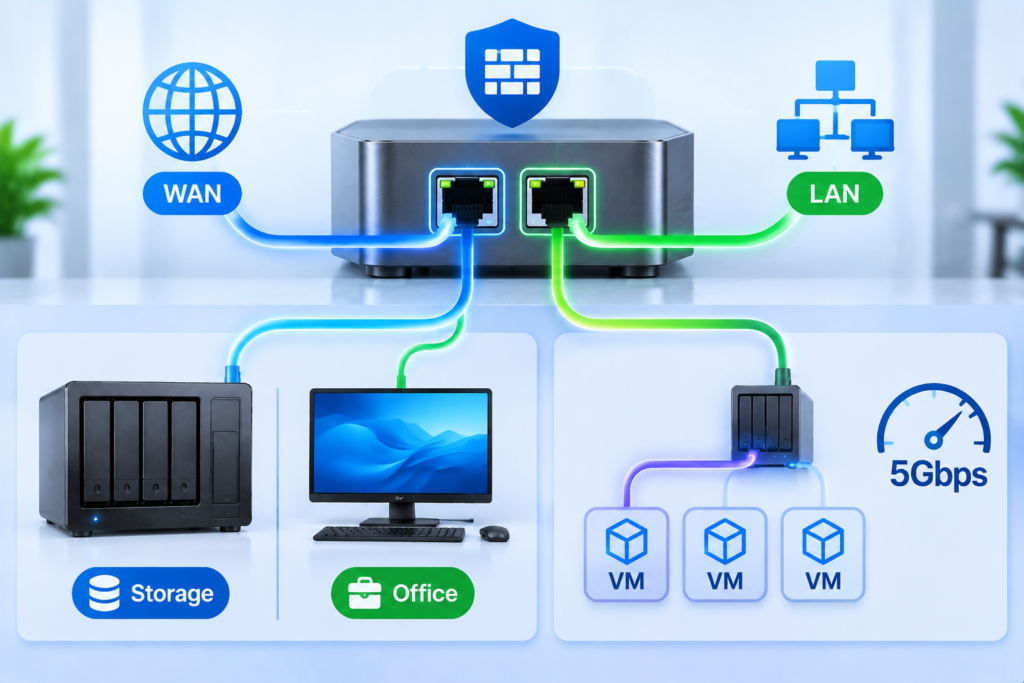
A second 2.5GbE port is worth paying for when the mini PC acts as a router or firewall and needs separated WAN and LAN interfaces, when storage and management traffic must not compete for one link, or when enough virtual machines run that a single uplink becomes a queue. On a single-purpose office desktop the second port usually sits idle.
WAN and LAN Separation
Physical separation beats logical separation on one interface: it removes a category of misconfiguration, keeps broadcast domains apart, and makes fault isolation straightforward. Two details decide success. Driver maturity matters, because open-source firewall distributions and hypervisor platforms do not treat every controller equally. Routing throughput matters more, because it is processor-bound once firewall rules, translation and tunnels are applied, and a low-power appliance saturates long before its port does.
Aggregation Versus Traffic Separation
Bonding two ports produces a 5Gbps logical link, but any single connection still travels over one physical member, so aggregate capacity rises for many clients while one large copy sees no benefit. Traffic separation is the more practical use of a second port: assigning one interface to a storage network and the other to office traffic keeps a nightly backup from competing with interactive file access, without any switch configuration. Deployments segmenting several networks at once move into the territory of a Mini PC with 4 LAN Ports, where port count defines the machine.
Matching Network Speed to the Workload
Match the port to the traffic the machine will carry over the next three to five years, not to the highest number on the datasheet. Gigabit remains correct for a large share of deployments, 2.5GbE covers most small-business and prosumer storage work, and 10GbE is a specialist requirement that brings cabling and thermal costs with it.
| Deployment | Recommended | Reasoning | Also verify |
| Office desktop or thin client | 1GbE | documents, web applications, voice | switch port count |
| Signage and kiosk players | 1GbE | local cache, no bulk transfer | wireless fallback |
| Small business file server | 2.5GbE | shared folders, nightly backup | array throughput |
| NAS companion and media host | 2.5GbE | library sync, metadata scans | switch and cable |
| Virtualization lab | 2.5GbE, dual preferred | images, snapshots, migration | memory, driver support |
| 4K editing from shared storage | 2.5GbE solo, 10GbE team | bitrate plus headroom | array read speed |
| Router or firewall appliance | Dual 2.5GbE minimum | WAN and LAN separation | routing throughput |
| Retail and industrial terminal | 1GbE | transactional traffic | mounting, power input |
Small business deployments are driven by headcount rather than file size. One gigabit uplink shared by ten people opening the same project folder saturates at peak hours even though no individual transfer is large. The method in this guide to a Mini PC NAS for Small Business applies directly: count concurrent users, estimate their peak working set, and size the uplink so the sum stays below seventy per cent of the link rate.
When 1GbE Is Still the Right Choice
Gigabit is correct more often than vendors suggest. It suffices when the far end is a single drive that cannot exceed the link, when work happens mainly in cloud applications, when large files move rarely enough that a few extra minutes are irrelevant, and when the budget is better spent on redundancy. There is also no penalty for starting there, because a 2.5GbE switch accepts gigabit devices without configuration.
When to Skip 2.5GbE Entirely
5GbE occupies an awkward position: narrower hardware support than either neighbour, Cat6 needed for its full rate, and no cost advantage over 2.5GbE. When more than 2.5Gbps is genuinely required, the next step is 10GbE.
10GBASE-T, part of the same IEEE 802.3 family, becomes justified with an all-flash array sustaining more than a gigabyte per second, multicamera editing of high-bitrate native footage, several hypervisor nodes sharing replicated storage, or dataset movement between machines. It also brings Cat6a or fibre, switches that multiply in price, and controllers that dissipate enough heat to need airflow in a chassis designed to be silent.
Cost, Power, and Heat in a Compact Chassis
In a mini PC the network upgrade is rarely about the port, which is usually already included. The cost sits in the switch, the cabling and the device at the other end, while the thermal budget matters far more than it would in a tower.
| Cost item | Typical impact | Note |
| Onboard 2.5GbE port | none | baseline on most current models |
| Unmanaged multi-gigabit switch | moderate | five to eight ports covers most networks |
| Peer device, NAS or workstation | high | the most common blocker |
| 10GbE controller and Cat6a | high | plus thermal design and airflow |
Power is rarely decisive at 2.5Gbps, since the physical layer adds little dissipation and a device drawing ten to fifteen watts at idle is unaffected. A 10GBASE-T controller is different, dissipating tens of watts and needing airflow a passive chassis cannot supply. In a fanless design the network controller shares the heat path of the processor, so sustained transfers raise the whole enclosure’s temperature rather than one component’s. Request idle consumption, consumption under sustained load, and the acoustic profile under that load; those three figures predict five-year operating cost better than the label on the power supply.
A Practical Buying Checklist
Verify port count, controller, driver situation and thermal design before comparing price. Those four items determine whether the specification on the page becomes throughput in the rack.
- Confirm the rate is stated per port, not as a maximum across a shared controller.
- Identify the controller family and confirm driver availability for the intended operating system.
- Establish whether the chassis is fanless and what sustained transfer does to internal temperature.
- Check the storage interfaces: how many M.2 slots, whether they use full-width lanes, and whether SATA is available.
- Confirm the power input range and adapter quality for continuous operation.
- Verify dimensions and mounting against the intended enclosure, rail or shelf.
- For multi-unit orders, ask whether the controller revision can be held consistent across the batch.
Questions Worth Asking a Supplier
Procurement teams often discover the difference between two nominally identical units after deployment. Four questions close most of that gap: whether the controller model and revision can be locked for the whole order, how long drivers and firmware will be supported, whether port layout can be adjusted for a project, and whether a per-batch test report covering throughput and thermal behaviour is available. On volume programmes the commercial terms and customisation options described under Wholesale mini pc mini computer usually matter more than a marginal difference in link rate.
FAQ
Does a 2.5GbE port make an internet connection faster?
No. Internet speed is set by the subscribed plan and by capacity beyond the building. The port accelerates transfers between devices on the same local network, and only when the plan itself exceeds 1 Gbps does the wide area side become relevant.
Can a 2.5GbE mini PC be connected to an existing gigabit switch?
Yes, and nothing is damaged. The link negotiates at 1Gbps and behaves like a gigabit connection. It delivers its rated speed only once the switch, cable and remote device all support 2.5Gbps, which makes the switch the logical first purchase.
How many simultaneous 4K streams can a 2.5GbE link carry?
Depends on the codec rather than the resolution. Delivery formats used for streaming need roughly 15 to 25 Mbps per stream, so the link carries dozens. Intermediate editing codecs at 4K can need several hundred Mbps each, limiting it to two or three simultaneous reads, and that is where a higher tier or a proxy workflow becomes the practical answer.